OHO Wallets: How to add OHO network to MetaMask Wallet
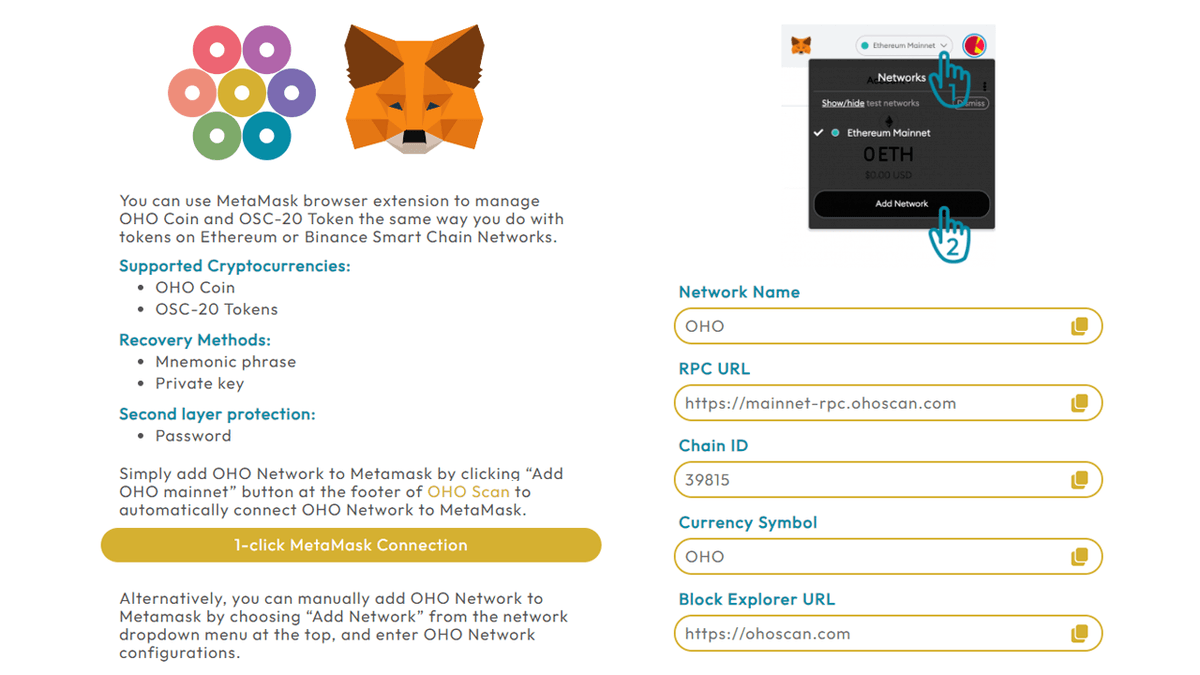
Anyone can use Metamask Mobile Wallet or browser extension to securely store OHO mainnet coin and any OSC20 tokens. Simply add Custom Network to MetaMask by using the network settings below:
A
AnonymousCryptoCompass newsroom
January 22, 2024
1 min read
NEWS
CryptoCompass editorial visual for guides coverage.
Anyone can use Metamask Mobile Wallet or browser extension to securely store OHO mainnet coin and any OSC20 tokens.
Simply add Custom Network to MetaMask by using the network settings below:
Once you’ve added OHO network to Metamask, you can now store, send, and receive OHO Coin and any OSC20 tokens on your mobile phone or computer.
Optional:
· To automatically add OHO Network to Metamask, you can just click “Add OHO mainnet” button at the footer of OHO Scan to automatically connect OHO Network to MetaMask.
NEAR rose to $3.68 on September 18, 2026, around 21 percent higher than 24 hours earlier. The trigger is documented and comes in two parts: near.com has launched confidential perpetual future
BNB Chain has become an active place for memecoin launches because users can create tokens, fund early rounds, and trade through decentralized liquidity pools with lower fees than many altern
Aptos has activated Confidential APT on its mainnet, giving users the option to keep their APT balances and transaction amounts private while leaving wallet addresses visible onchain. The Apt